A QR code can connect a commercial vehicle to a quote form, service page, menu, event registration, or special offer. It can also provide a measurable response that is easier to track than someone remembering the company name and searching for it later.
But a QR code is not useful simply because it appears on the vehicle.
If the code is too small, placed over a door seam, surrounded by busy graphics, distorted by a body curve, or displayed mainly while the vehicle is moving, few people will be able to scan it. In some situations, asking road users to reach for a phone is also inappropriate and unsafe.
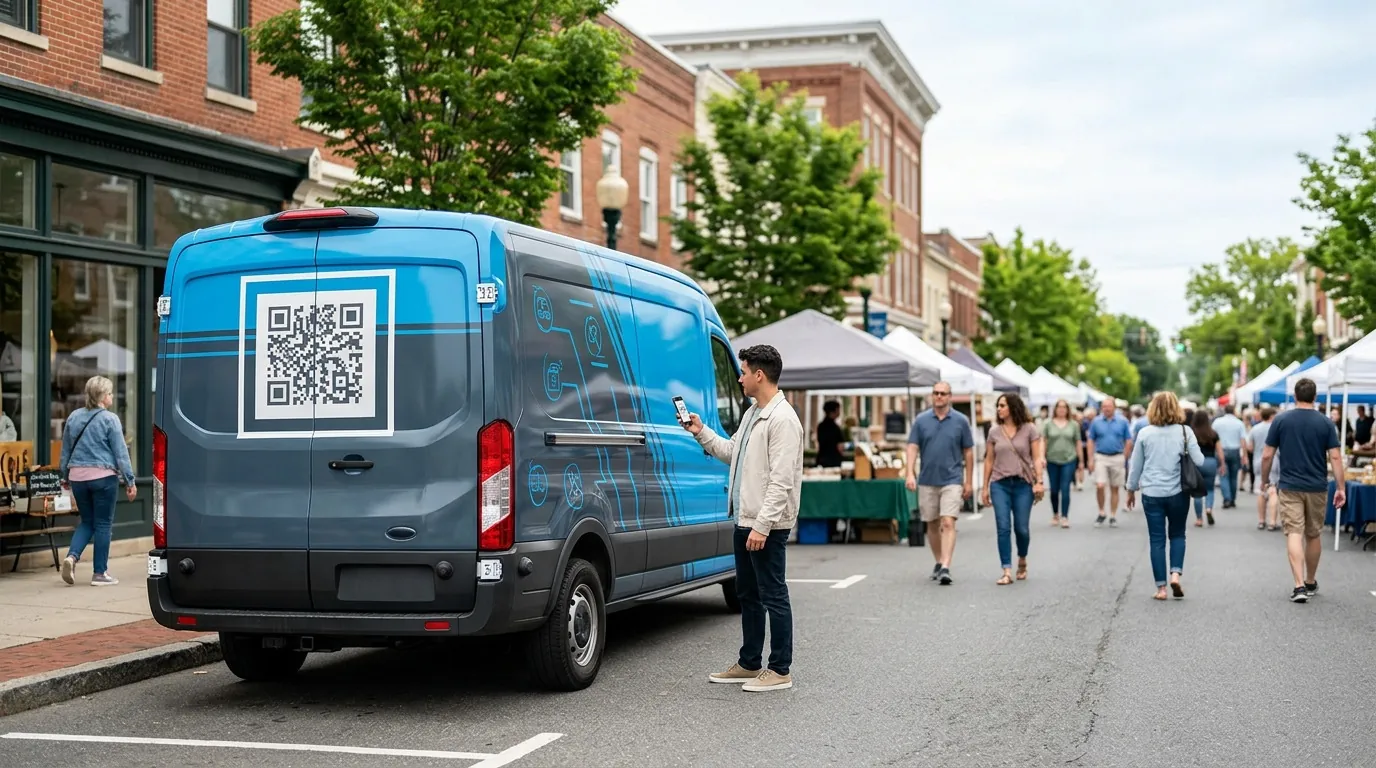
A vehicle QR code works best when the vehicle is frequently viewed while parked. At Pixel Wraps, we treat it as a secondary response tool—not a replacement for a readable company name, clear service category, phone number, or short website. 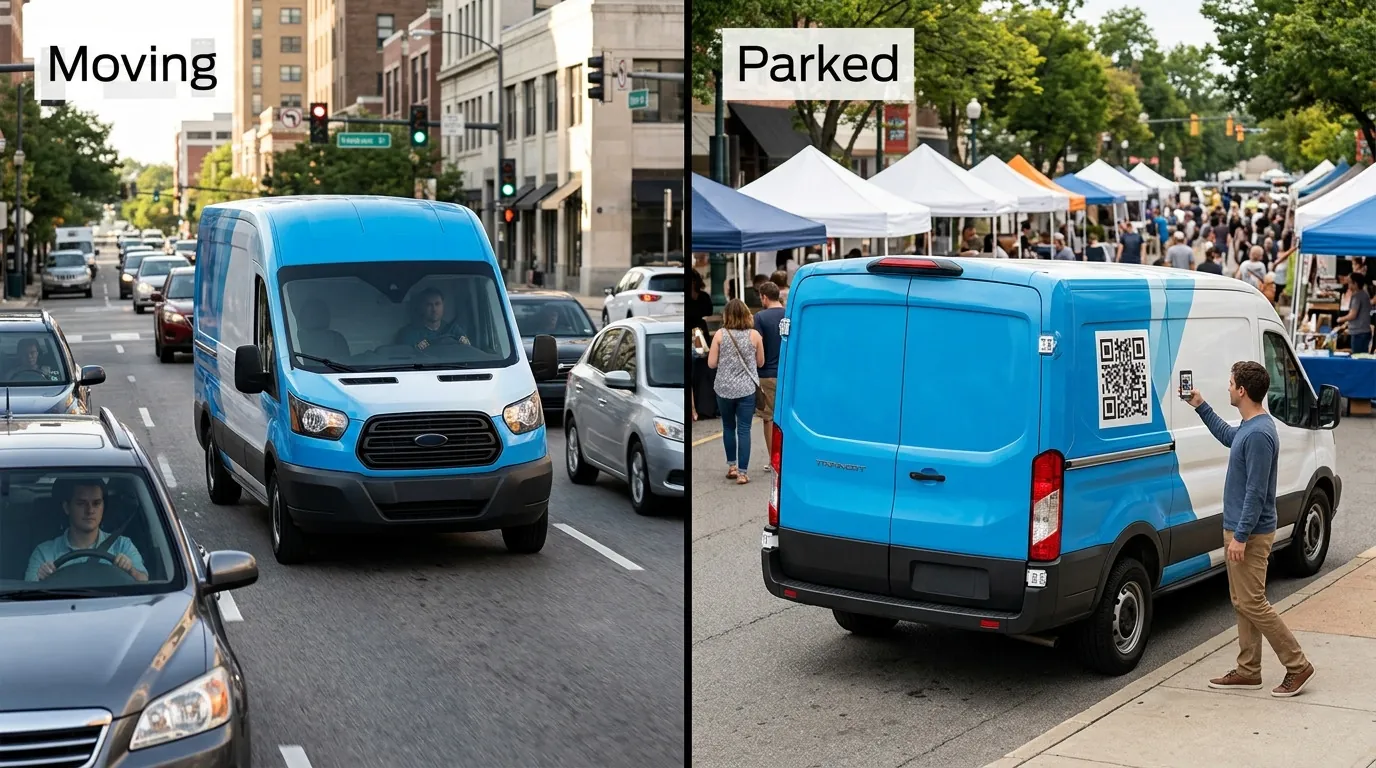
Decide What the QR Code Is Supposed to Do
A QR code should have one clear destination and one clear purpose.
Sending everyone to the homepage may be convenient, but it does not necessarily provide a better experience than displaying the company’s website.
Stronger destinations may include:
- Request-a-quote form
- Campaign landing page
- Service-specific page
- Food truck menu
- Online ordering page
- Event registration
- Appointment booking
- Current promotion
- Project gallery
- Review page
- Donation page
- App download page
- Contact card
- Emergency service request
The destination should match where and why people see the vehicle.
A food truck customer may need a menu. Someone viewing a contractor’s truck at a job site may want project examples. A trade-show vehicle may lead to event registration. A delivery fleet may not need a QR code at all if the main objective is brand recognition.
QR Codes Work Best on Parked Vehicles
The most suitable vehicles are regularly observed by pedestrians or people who are already stationary.
Useful applications include:
- Food trucks
- Mobile retail vehicles
- Event vehicles
- Trade-show displays
- Vehicles parked at job sites
- Contractor vans outside customer properties
- Real estate vehicles at open houses
- Mobile clinics
- Nonprofit outreach vehicles
- Campus shuttles at stops
- Branded trailers at events
- Vehicles parked outside a storefront
In these settings, a person has time to notice the code, open the camera, align the phone, and wait for the destination to load.
The viewing environment may still include glare, shadows, dirt, distance, and partial obstructions, so placement and testing remain important.
Do Not Design a QR Code for Drivers to Scan
A moving vehicle should not depend on a QR code as its primary call to action.
The National Highway Traffic Safety Administration defines distracted driving as any activity that diverts attention from driving, including phone use. NHTSA stresses that safe driving requires full attention. NHTSA distracted-driving guidance
Vehicle graphics should not instruct drivers to scan while driving or create a message that assumes they will.
For road visibility, prioritize:
- Memorable company name
- Clear business category
- Short website
- Readable phone number
- Strong brand colors
- Simple visual identity
A passenger may scan the code, or the vehicle may later be seen while parked, but the wrap should remain effective without that interaction.
Do Not Let the Code Replace the Brand
A QR code is not an explanation.
A person should not have to scan the vehicle to learn who the company is or what it does. If the code is the largest element, the design may miss the opportunity to build recognition among everyone who does not scan it.
The primary hierarchy should remain:
- Company name or logo
- Business or service category
- Main response method
- QR code as a supporting action
A short instruction can explain what the scan provides:
- Scan for a Quote
- View Our Menu
- Book Service
- See Our Work
- Check Availability
- Register Here
- Donate
- Apply Now
The instruction should be brief. A long explanation creates another block of text competing with the code.
Use a Short Redirect Instead of Encoding a Long URL
The amount of information encoded in a QR code affects its complexity.
A long URL with several tracking parameters can create a denser pattern with smaller modules. Dense codes can be more difficult to reproduce and scan from a vehicle surface, particularly when viewed at a distance.
A better approach is to use a short URL controlled by the business:
company.com/road
company.com/scan
company.com/menu
That address can redirect to a longer campaign URL containing tracking parameters.
This approach provides several advantages:
- Simpler QR pattern
- Easier testing
- Cleaner destination management
- Ability to update the final page
- Short readable backup URL
- Less dependence on a third-party QR platform
The business should retain control of the domain and redirect. A wrap may remain in service for years, so the link cannot depend on a temporary account that may expire.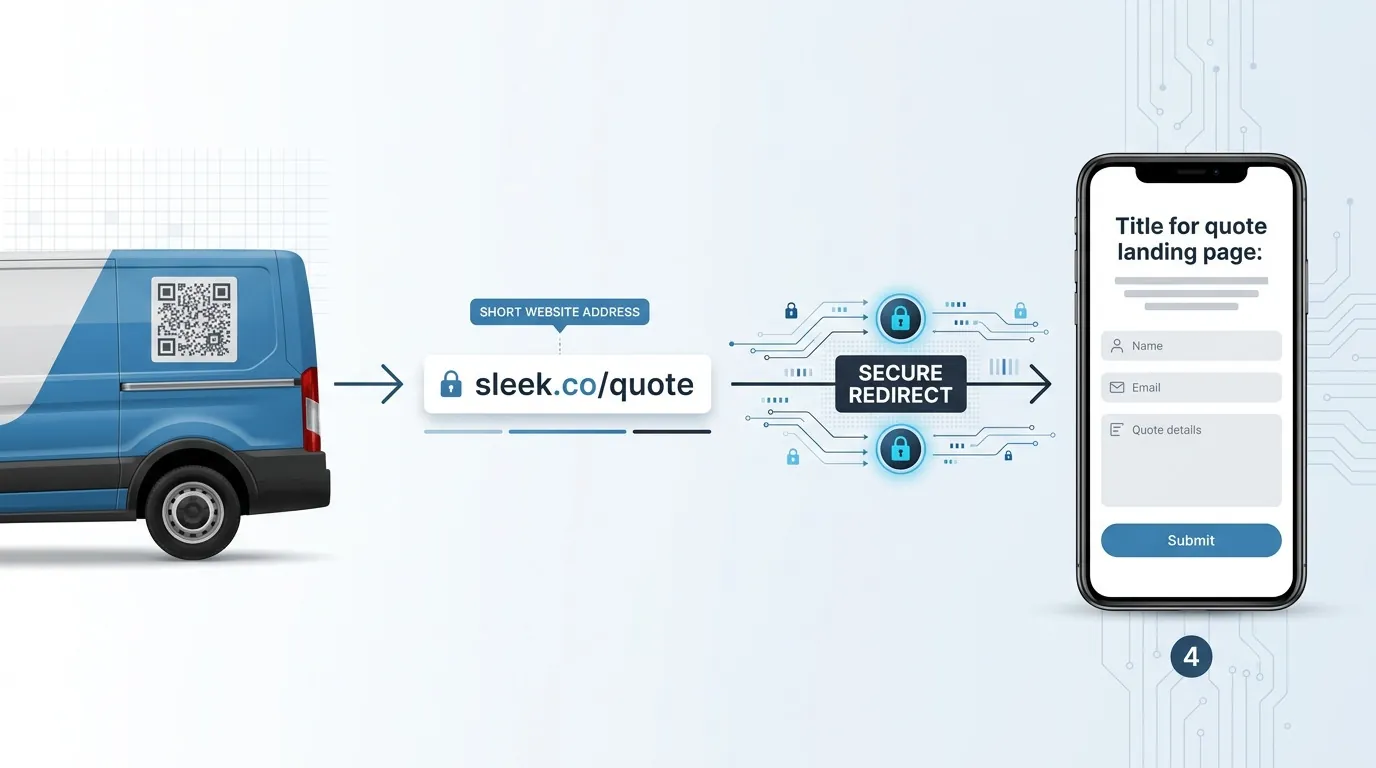
Choose Between Static and Dynamic QR Codes Carefully
A static QR code permanently encodes the destination. If the URL changes or stops working, the printed code must be replaced.
A dynamic QR code generally points to a managed redirect that can send users to a different destination later. It can also provide scan reporting.
Static QR Code
Advantages
- Simple
- No subscription required
- Can point directly to a business-owned URL
- Does not depend on a QR provider when using a permanent destination
Limitations
- Final destination cannot be changed without changing the URL or redirect
- Direct long URLs can create dense codes
- Tracking must be handled through the destination analytics
Dynamic QR Code
Advantages
- Destination can usually be updated
- Scan reporting may be included
- Campaigns can change without reprinting the code
Limitations
- May depend on an ongoing subscription
- Code can stop working if the account closes
- Business may not control the redirect domain
- Data access depends on the provider
A business-owned short redirect can combine useful features from both approaches. The printed code remains stable, while the destination can be managed through the company’s domain.
Keep the Code Visually Simple
QR codes can be styled, but aggressive customization can reduce reliability.
DENSO WAVE, the inventor of the QR code, warns that deforming the symbol or overlaying designs can make reading slower or impossible. DENSO WAVE QR-code guidance
For vehicle applications:
- Use strong dark-light contrast
- Keep the finder patterns clear
- Avoid decorative distortion
- Do not stretch the code
- Do not crop it
- Avoid placing photographs behind it
- Do not cover important modules with a large logo
- Do not use a reflective background that causes glare
- Test any color variation
- Preserve a clear border
A branded frame can sit around the code without altering the code itself. The company’s colors can appear in the instruction or surrounding panel while the symbol remains clean.
Preserve the Quiet Zone
A QR code needs clear space around all four sides.
This space is called the quiet zone. It separates the code from nearby text, photographs, patterns, seams, and other graphic elements.
DENSO WAVE specifies a clear margin four modules wide around a standard QR code. A module is one of the small squares that constructs the symbol. DENSO WAVE code-area guidance
On a vehicle, the quiet zone should remain clear of:
- Panel seams
- Door gaps
- Handles
- Trim
- Rivets
- Text
- Borders
- Photographs
- Patterns
- Body contours
Adding extra clear space can improve visual separation when the surrounding wrap is busy.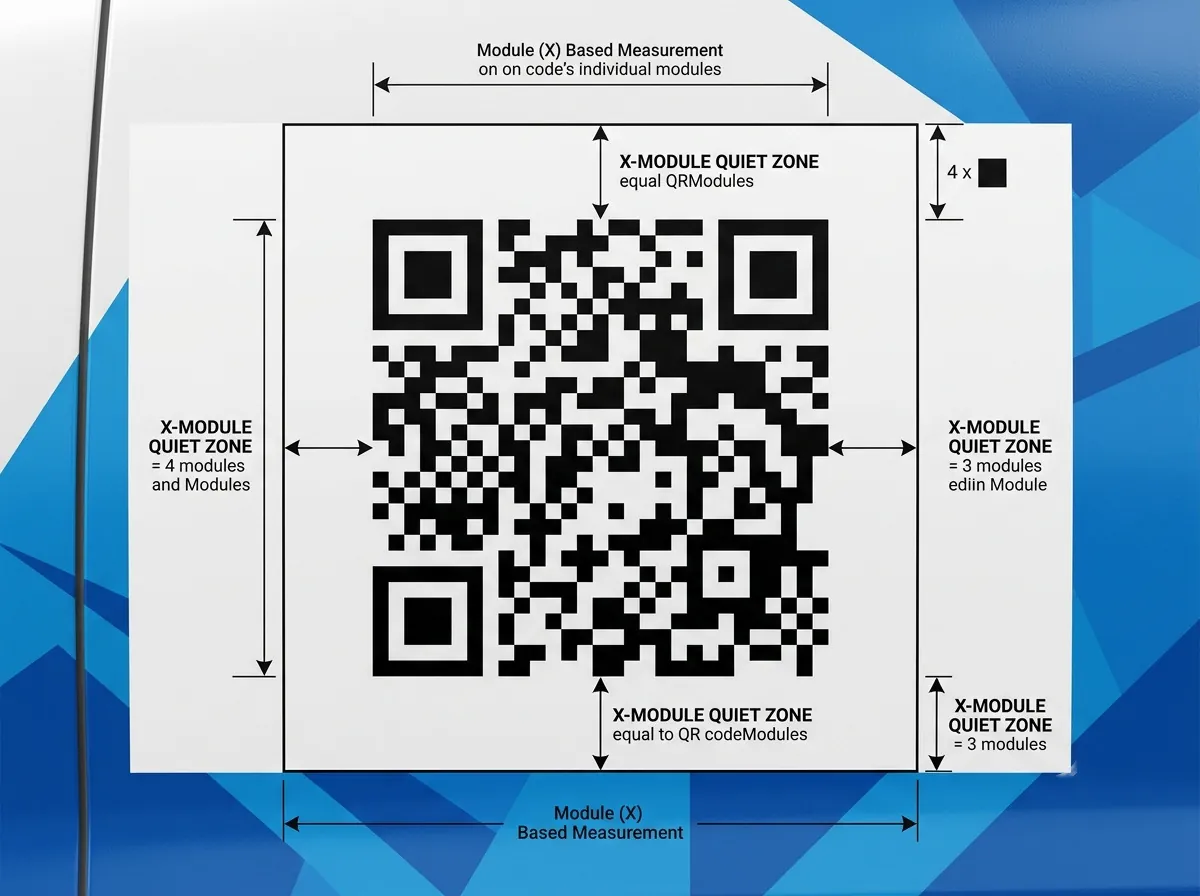
Size the Code for the Real Viewing Distance
There is no single correct vehicle QR-code size.
The correct size depends on:
- Scanning distance
- Camera quality
- Code complexity
- Surface angle
- Lighting
- Contrast
- Vehicle movement
- Print quality
- Destination length
- Amount of environmental dirt
- Panel flatness
A code that scans from 12 inches away on a computer screen may fail from several feet away on a vehicle.
Instead of relying only on a generic ratio, test the exact production code at the intended printed size and viewing distance.
Testing should include:
- Multiple phone models
- Native phone cameras
- Android and iOS devices
- Bright sunlight
- Shade
- Low light
- Straight-on view
- Angled view
- Clean and lightly dirty surface
- Expected scanning distance
- Printed sample at actual size
If users will scan from six to ten feet away, test from six to ten feet. Do not approve it based on a scan performed inches from the print.
Keep the Encoded Data Short
QR codes contain modules arranged in a square grid. Higher versions contain more modules and can hold more data.
DENSO WAVE explains that QR-code versions range from 21 by 21 modules to 177 by 177 modules. As the amount of encoded data increases, more modules are required. DENSO WAVE QR-code version information
On a vehicle, fewer and larger modules are generally easier to reproduce and scan than an unnecessarily dense code of the same physical size.
To reduce complexity:
- Encode a short URL
- Avoid placing full contact cards directly into the code
- Avoid long query strings
- Use a business-owned redirect
- Remove unnecessary URL characters
- Select error correction based on the environment
- Generate the code at high resolution or as vector artwork
The production file should never be a low-resolution screenshot.
Select Error Correction for the Environment
QR codes include error-correction capability that can restore data when part of the code is damaged or dirty.
DENSO WAVE identifies four standard error-correction levels. Higher correction can recover more data but increases the amount of information the code must contain, potentially making the symbol denser. DENSO WAVE error-correction explanation
Vehicle graphics are exposed to:
- Road dirt
- Salt
- Rain
- Scratches
- Cleaning
- Panel damage
- Sunlight
- Insects
- Fuel or chemical contamination
Higher error correction may be appropriate in demanding conditions, but it should not be used as permission to place the code over a seam or allow it to become heavily damaged.
The final code must be tested after selecting the destination, version, error correction, physical size, and print method.
Place the Code on a Flat, Stable Panel
QR codes rely on a consistent square grid. Distortion can interfere with scanning.
Better locations include:
- Flat cargo-van side panels
- Flat rear doors
- Box-truck sides
- Trailer panels
- Food-truck service panels
- Interior display panels used at events
- Flat tailgate areas where unobstructed
Avoid:
- Deep recesses
- Compound curves
- Bumpers
- Wheel arches
- Door handles
- Corrugated surfaces
- Roll-up door joints
- Panel edges
- Areas covered by ladders
- High-wear utility compartments
- Areas hidden when doors open
The code may cross a minor body feature and still scan during testing, but reliable placement should not depend on error correction compensating for a preventable design decision.
Be Careful With Windows and Perforated Vinyl
A QR code can sometimes be placed on a vehicle window, but several factors can reduce scan reliability:
- Glass reflection
- Interior darkness
- Window tint
- Curvature
- Defroster lines
- Wipers
- Moving doors
- Perforated film holes
- Changing background behind the glass
A code printed on perforated window film does not have the same continuous surface as a code printed on opaque vinyl. Small modules may be broken apart by the perforation pattern.
If a window location is necessary, produce a full-size sample using the actual film and test it on the vehicle under several lighting conditions.
An opaque code panel on bodywork is usually easier to control.
Do Not Place the Code Too Low or Too High
A code near the rocker panel may collect dirt and road spray. It may also require the user to crouch or angle the phone.
A code placed near the roofline may be difficult to reach visually when the viewer is close to the vehicle.
The ideal height depends on:
- Vehicle type
- Expected viewer position
- Sidewalk or parking conditions
- Scanning distance
- Body-panel availability
- Equipment
- Door operation
For a parked van or food truck, a code near normal chest or eye level may be practical. On a box truck, a somewhat higher code can work when scanned from farther away.
The placement should be tested with a real person and vehicle, not decided only from a template.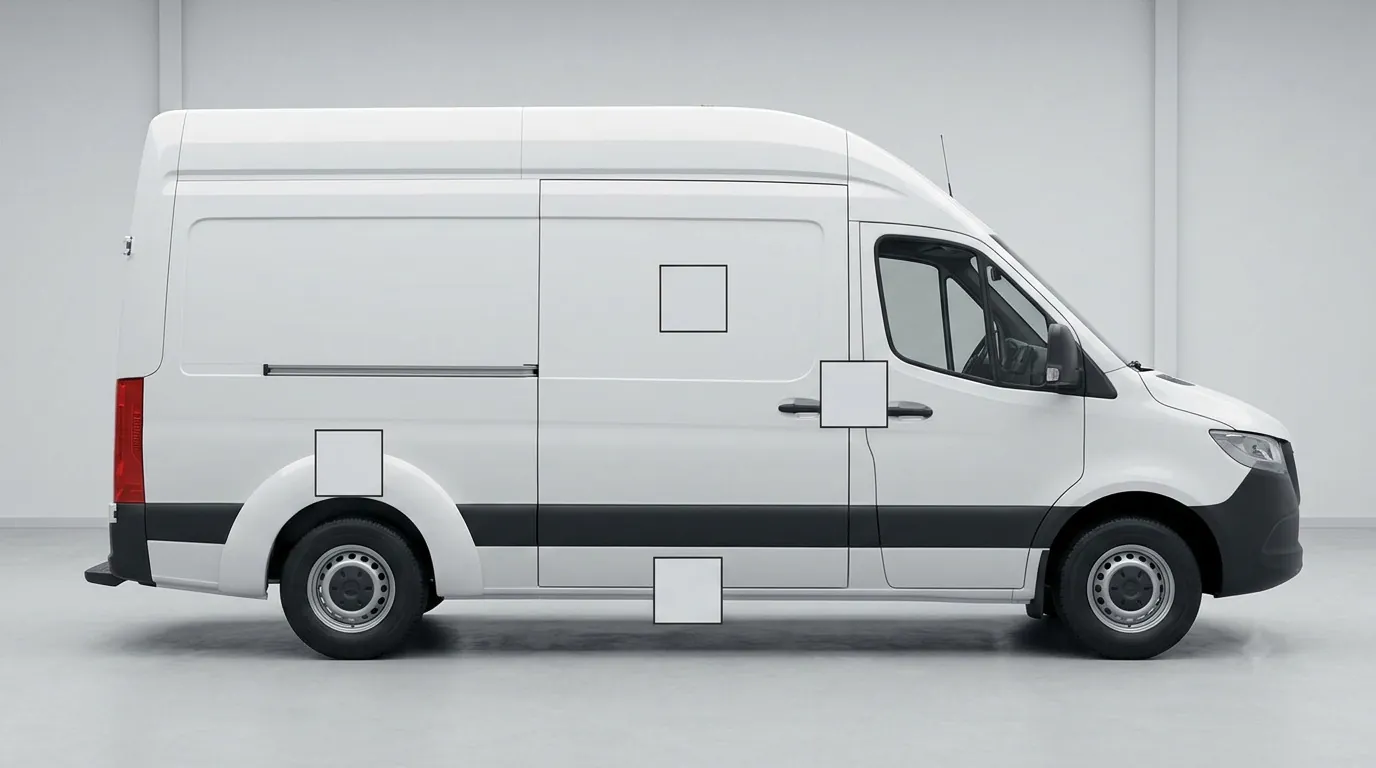
Build a Mobile Landing Page for the Scan
The scanning experience does not end when the code works.
The destination should be designed for a person using a phone, possibly while standing outside, at an event, or near the vehicle.
The landing page should have:
- Fast loading
- Clear company identification
- Message matching the vehicle
- One primary action
- Short form
- Tap-to-call option
- Appropriate service area
- Project or product context
- Secure connection
- No unnecessary pop-ups
A person scanning “View Our Menu” should reach the menu, not the homepage. A person scanning “Request a Quote” should reach a short quote form, not a long company history.
Add Campaign Tracking to the Destination
A QR code can make vehicle response measurable.
The destination can use campaign parameters to identify visits associated with the vehicle graphics. Google Analytics supports URL parameters that allow campaign traffic to appear in acquisition reporting. Google Analytics URL-builder guidance
A campaign structure could identify:
- Source as vehicle
- Medium as QR code
- Campaign as fleet graphics
- Content as van, truck, trailer, event, or branch
The exact naming system matters less than consistency.
Before printing:
- Create the destination
- Add tracking parameters
- Set up the short redirect
- Generate the QR code
- Test the redirect
- Confirm analytics reporting
- Test the code at production size
- Save the final vector asset
Do not wait until after installation to discover that the campaign was not configured correctly.
Avoid Tracking Every Vehicle Separately Without a Reason
Assigning a different QR code to every vehicle can provide detailed reporting, but it also creates more artwork, tracking links, redirects, records, and replacement files.
Vehicle-level tracking may be useful when:
- Routes differ significantly
- Branches need separate reporting
- Franchise locations are involved
- Vehicles promote different services
- A controlled test is being conducted
- Events use separate campaigns
- Performance by region matters
One fleet-wide code may be better when:
- Vehicles share the same service area
- The same landing page applies
- Simplicity is important
- Replacement graphics must remain interchangeable
- The business does not need vehicle-level attribution
Tracking detail should serve a business decision. Collecting more data is not automatically more useful.
Plan for the Code’s Entire Service Life
A vehicle wrap may remain active long after a short promotion ends.
Before printing, ask:
- Who owns the destination domain?
- Can the destination be changed?
- Does the QR provider require a subscription?
- What happens if the subscription ends?
- Will the landing page remain active?
- Is the offer likely to expire?
- Can the code be replaced separately?
- Is the QR area part of a removable panel?
- Who is responsible for testing it periodically?
If the code supports a temporary campaign, design it as a replaceable decal rather than embedding it permanently into the main wrap.
This allows the business to update the offer without reprinting a full vehicle side.
Include a Readable Backup
Technology can fail. Cameras differ, internet connections drop, codes become dirty, and landing pages change.
Place a short readable URL near the QR code whenever space allows. This gives people another way to reach the destination and helps the business identify what the code is connected to.
The backup should not be a long URL filled with tracking parameters. Use the same short redirect encoded in the QR code.
Test the Installed Code Again
A code that scans on a flat production table may behave differently after installation.
The body panel can introduce:
- Curvature
- Reflections
- Seams
- Lighting changes
- Angle
- Surface distortion
- Nearby graphic interference
After installation, test the code:
- From the intended distance
- With multiple devices
- In daylight
- In shade
- From slight angles
- With doors closed
- With doors open where applicable
- After the vehicle has been cleaned
Photograph and document the final position. The destination should also be checked periodically throughout the campaign.
When a QR Code Should Be Left Off the Wrap
A QR code may not be worthwhile when:
- The vehicle is almost always moving
- The available panel is too small
- No suitable flat surface exists
- The destination is not ready
- The business cannot maintain the link
- The design is already crowded
- The code would replace essential branding
- The only location is a perforated or reflective surface that fails testing
- A short website would work better
- The campaign will end shortly without a replacement plan
Removing the code can make space for a larger company name, clearer service category, or more readable website.
Use QR Codes as Part of a Complete Response System
A well-planned vehicle QR code can support tracking and make it easier for stationary viewers to act. It should not carry the entire burden of the wrap.
Pixel Wraps designs commercial vehicle graphics around how vehicles are actually seen and used. When a QR code makes sense, we help integrate it without weakening the main brand message.
Our team can account for:
- Vehicle type
- Viewing conditions
- QR-code placement
- Clear-space requirements
- Printed size
- Panel shape
- Wrap design hierarchy
- Replaceable campaign decals
- Short URL placement
- Full-size production testing
- Final installation testing
- Fleet-wide consistency
Pixel Wraps provides design, printing, lamination, and certified installation for commercial vehicles throughout New York City, New Jersey, Pennsylvania, and the tri-state area. Contact us with your vehicle, campaign destination, and intended scanning environment. We will help determine whether a QR code belongs on the wrap and where it can be used effectively.